Home › AI Video Tools › 9 Best Free AI Video Generators in 2026 (No Watermark Options Tested)
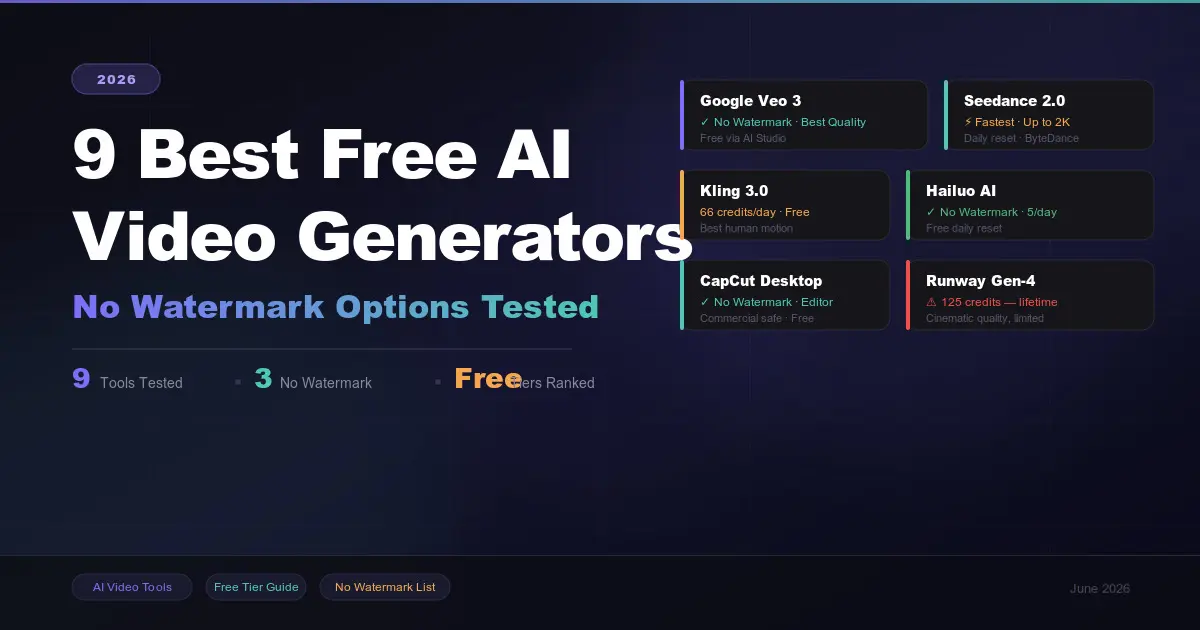
9 Best Free AI Video Generators in 2026 (No Watermark Options Tested)
Finding a genuinely free AI video generator in 2026 is harder than it looks. Most tools advertise "free" but deliver watermarked 5-second clips, one-time trial credits that run out in a day, or paywalled exports the moment you try to download anything useful.
We created accounts, spent real free credits, and tested 9 platforms across three identical prompts — a cinematic landscape shot, a talking-head scene, and a stylized motion effect. Here's what we found.
Recommended for you
Best Free AI Video Generators in 2026 (No Watermark Text-to-Video Tools Reviewed)
The short answer: Google Veo 3 leads on raw quality. Seedance 2.0 wins on speed. Kling 3.0 offers the most generous daily free credits. CapCut Desktop is the best free no-watermark editor. But the right pick depends entirely on what you're making — this guide breaks it down tool by tool.
How We Tested
Every tool was evaluated on a fresh free-tier account with no paid credits. We scored each on four things: free tier limits (daily credits, clip length, whether they reset), watermark policy, output resolution, and commercial rights.
Important: Free tiers change constantly. Hailuo went from unlimited free generations to 3 per day within six months of launch. OpenAI discontinued Sora entirely on April 26, 2026. Always verify current limits before building any workflow around a "free" tier.
Quick Comparison Table
| Tool | Free Credits | Watermark | Max Resolution | Commercial Use |
|---|---|---|---|---|
| Google Veo 3 | Rate-limited (AI Studio) | None ✓ | 1080p / 8s | Yes ✓ |
| Seedance 2.0 | Daily reset | Yes | Up to 2K / 10s | Yes ✓ |
| Kling 3.0 | ~66 credits/day | Yes | 720p | Limited |
| Hailuo AI | 3–5 clips/day | None ✓ | 720p / 6s | No |
| CapCut Desktop | Unlimited editing | None ✓ | 1080p | Yes ✓ |
| Runway Gen-4 | 125 credits (lifetime) | Yes | 720p | No |
| Luma Dream Machine | Limited daily drafts | Yes | 720p draft / 5s | No |
| HeyGen | 3 videos/month | Yes | 720p | No |
| InVideo AI | 10 AI min/week | Yes | 720p | No |
The 9 Tools, Reviewed
1. Google Veo 3 — Best Overall Quality
Access via Google AI Studio · No watermark · Commercial safe
Veo 3 produces the most realistic AI video available on a free tier in 2026. It handles complex multi-object scenes, renders accurate physics, and generates native audio alongside the video — a feature almost no other free tool offers. Access it through Google AI Studio with just a Google account, no credit card required.
Free tier: Rate-limited access, limits not publicly published but practically usable for testing and low-volume creation. No watermark, no credit card, and commercial use is permitted.
What it's great at: Landscape shots, cinematic scenes, multi-object environments, and nature clips look genuinely professional. It also handles camera movement prompts better than most competitors.
Downsides: Generation takes 2–4 minutes per clip. Free access can be inconsistent depending on demand. No direct automation API for free users.
Best for: Anyone prioritizing output quality over volume. Start here when the visual result is what matters most.
2. Seedance 2.0 — Fastest Generation, Highest Free Resolution
ByteDance · Daily reset credits · Watermarked · Commercial safe
Released by ByteDance (TikTok's parent company) in February 2026, Seedance 2.0 immediately drew attention from the AI video community. Its standout advantage is speed — clips generate in roughly 30 seconds — and it offers the highest free-tier resolution of any tool we tested, up to 2K. Daily credits reset, so you can build a consistent workflow without paying.
The catch: free exports carry a watermark. But commercial use is explicitly permitted even on the free tier, which is unusually generous.
Free tier: Daily credit reset. Exact daily amount varies but multiple clips per day are achievable. Watermark applied to free output.
What it's great at: Rapid prototyping, social media content iteration, and any workflow that values speed. The 30-second generation time plus daily resets make it the best option when volume matters.
Downsides: Watermark on all free output. As a relatively new launch, the free tier may tighten over time — Hailuo's trajectory from unlimited to 3/day is the template.
Best for: Content creators who need to move fast and iterate often. Pair with CapCut Desktop to remove the watermark on final exports (paid upgrade required on Seedance itself).
3. Kling 3.0 — Most Generous Daily Credits
Kuaishou · ~66 credits/day · Watermarked · Best human motion
Kling 3.0 offers approximately 66 free credits per day — enough for around 6 five-second clips — making it the most consistently usable free tool for daily production. The credit count renews every 24 hours, so unlike Runway's one-time credits, you can build a real workflow around it.
Version 3.0 added native audio generation, multi-shot storyboards, and stronger instruction following, which makes it particularly useful for dialogue-heavy or character-driven content.
Free tier: ~66 daily credits, renewing every 24 hours. Watermarked. 720p resolution on free. Commercial rights are limited — check current terms before publishing.
What it's great at: Human motion, face consistency, and dialogue-timing scenes. Kling has consistently led on body physics and natural movement.
Downsides: Watermark on all free exports. Only 720p at free tier. Queue times vary significantly by region.
Best for: Creators who need realistic human subjects — product walkthroughs, character scenes, or social content featuring people.
4. Hailuo AI (MiniMax) — Best No-Watermark Free Option
MiniMax · 3–5 clips/day · No watermark · No commercial rights
Hailuo is notable for one thing most tools won't offer on free: watermark-free output. This makes its free clips actually usable for personal projects, portfolios, and organic social media posts without looking unprofessional.
The trade-off is volume — it now limits free users to 3–5 clips per day, down from the unlimited access it offered at launch. Commercial use is also not permitted on the free tier, limiting its value for professional work.
Free tier: 3–5 generations per day with daily reset. No watermark. AI voiceover generation included. 720p, 6-second maximum clip length.
What it's great at: Clean, watermark-free output for personal use. AI voiceover tools make it one of the few free options that handles audio natively.
Downsides: No commercial rights on free. Volume is low. Used to be unlimited — free limits may tighten further.
Best for: Personal projects, portfolio demos, and social media where you want clean output without a visible logo but don't need commercial rights.
5. CapCut Desktop — Best Free Editor with No Watermark
Editing + AI tools · No watermark · Commercial safe · Not generative
CapCut isn't a text-to-video generator in the traditional sense — it doesn't create footage from scratch via prompts. But it earns a top spot because the desktop app exports watermark-free with commercial usage rights on the free plan, and it includes powerful AI tools: auto-captions, background removal, AI effects, and 5,000+ templates.
For anyone serious about free AI video, CapCut Desktop is the essential finishing layer — take raw clips from Veo 3 or Seedance and turn them into polished, publishable content at zero cost.
Free tier: Unlimited editing and export. No watermark. 1080p. Commercial use permitted. AI generation features have separate credit limits.
Best for: Editing, finishing, and publishing AI-generated clips from other tools. The combination of Veo 3 (raw generation) and CapCut Desktop (editing and export) creates a fully free, watermark-free production workflow.
6. Runway Gen-4 — Cinematic Quality, Nearly Useless Free Tier
Runway · 125 lifetime credits · Watermarked · No commercial rights
Runway is objectively one of the most powerful AI video tools available in 2026. Gen-4 produces cinematic output with advanced camera controls, motion brushes, and AI model training capabilities. If quality is your ceiling, Runway is near the top.
The problem is the free tier. You get 125 credits total — not monthly, not daily, but for your entire lifetime on the platform. At roughly 5 credits per second of video on Gen-4 Turbo, that's approximately 25 seconds of video before your free access is permanently exhausted.
Free tier: 125 one-time credits. Watermarked. 720p. No commercial rights. 3 projects max, 5GB storage.
Best for: Evaluating whether the quality justifies upgrading. Use your 125 credits deliberately to assess the output — don't waste them on test prompts. The Standard plan at $12/month (annual) gives 625 credits monthly.
7. HeyGen — Best for AI Avatar and Presenter Videos
HeyGen · 3 videos/month · Watermarked · No commercial rights (free)
HeyGen is the standout tool for presenter-led, avatar-driven video — not generative AI clips. The free plan gives 3 videos per month (up to 3 minutes each) with access to 1,100+ stock AI avatars, voice cloning, and dubbing in 175+ languages. The feature depth inside those limits is impressive for onboarding videos, product demos, or educational explainers.
Free tier: 3 videos per month, 3-minute maximum per video. Watermarked. No commercial rights. Full avatar and voice library accessible.
Best for: HR teams, educators, and SaaS demos that need talking-head presenter content. Not useful for raw generative footage — this is purely the avatar workflow.
8. InVideo AI — Best for Full Videos from a Single Prompt
InVideo · 10 AI minutes/week · Watermarked · No commercial rights (free)
InVideo AI takes a different approach — rather than generating raw footage, it assembles complete videos from your prompt using stock footage, auto-generated voiceover, and background music. Type a prompt and get a fully edited short video with narration in about 90 seconds.
This assembly approach often produces more "finished" looking content than raw generation, especially for explainers and social clips. The free plan gives 10 AI minutes per week with watermarked exports.
Free tier: 10 AI video minutes per week. Watermarked. 720p. No commercial rights.
Best for: Marketers and social media teams who need complete, edited short-form videos quickly — not raw AI footage. 5,000+ templates make production fast for anyone without video editing skills.
9. Luma Dream Machine — Beautiful Quality, Very Limited Free Tier
Luma · Draft-only free tier · Watermarked · No commercial rights
Luma produces some of the smoothest, most photorealistic motion in the AI video space. The free tier technically exists, but it's heavily restricted: draft resolution with watermarks, non-commercial license, lowest generation priority (meaning you wait longer in queues), and a 5-second maximum clip length.
It's worth knowing for its quality ceiling. It's not worth building a free workflow around.
Free tier: Draft resolution. Watermarked. 5-second clips. Non-commercial only. Low-priority queue.
Best for: Photographers and visual artists who want to preview Luma's cinematic realism before committing to a paid plan. The quality benchmark is genuinely impressive — the free access is not.
Free AI Video Generators with No Watermark — The Short List
This is the most searched qualifier, and the honest answer is: only three tools reliably deliver watermark-free output on free tiers right now.
Google Veo 3 (via AI Studio) — Watermark-free, commercial safe, best quality. The top pick if you need clean output without paying.
Hailuo AI — Watermark-free but no commercial rights and only 3–5 clips per day.
CapCut Desktop — No watermark on exports, commercial safe, but this is an editor, not a from-scratch generator.
Runway technically produces no-watermark output with its free 125 credits, but those credits are so limited they don't constitute a usable free tier.
If no-watermark is a hard requirement and you need volume, the only reliable long-term solution is running an open-source model locally. Wan 2.2 is the current community standard. This requires a capable GPU and technical setup, but produces unlimited watermark-free output at no ongoing cost.
Frequently Asked Questions
What is the best completely free AI video generator in 2026?
It depends on your priority. For the highest visual quality with no watermark: Google Veo 3 via AI Studio. For the fastest daily production volume: Seedance 2.0. For the most credits per day with a reliable daily reset: Kling 3.0 (~66/day). For editing and finishing without a watermark: CapCut Desktop. There is no single "best" — the right answer changes based on what you're making.
Can I use free AI video generators for commercial purposes?
Only some tools allow it. Google Veo 3 and Seedance 2.0 both permit commercial use on free tiers. CapCut Desktop free exports are also commercially safe. HeyGen, Hailuo, Runway, Luma, and InVideo all explicitly exclude commercial rights on free plans. Always read the terms of service before publishing AI-generated video for monetized channels or client work.
Are free AI video generators good enough for YouTube?
For B-roll, short clips, and stylized content: yes. Veo 3, Seedance 2.0, and Kling 3.0 produce footage that works on YouTube when mixed into edited content. For full YouTube videos with narration, structure, and branding, you'll likely need a combination of tools — Veo 3 for visuals, a free TTS or voiceover tool for narration, and CapCut Desktop for assembly and editing.
Is Sora still available in 2026?
No. OpenAI discontinued Sora on April 26, 2026. Any comparison article recommending Sora that hasn't been updated since then is outdated.
What happened to Hailuo's unlimited free tier?
Hailuo originally launched with unlimited free generations as a market-building strategy. By early 2026, that dropped to approximately 3–5 clips per day. This pattern is common — new AI video tools launch generously free, then tighten limits as adoption grows. Seedance 2.0 is currently in its generous launch window; expect limits to tighten by late 2026.
What is the best free AI video generator with no sign-up?
Most high-quality tools require account creation. Your lowest-friction option is Google AI Studio — you need a Google account but no credit card and no separate registration. For truly no-account generation, some third-party wrappers exist but output quality is significantly lower.
How long can free AI video clips be?
Most free tiers cap clips at 4–10 seconds. Seedance 2.0 allows up to 10 seconds, Veo 3 up to 8 seconds, Hailuo caps at 6 seconds, and Luma Dream Machine allows only 5 seconds on free. For longer finished videos, InVideo AI assembles full pieces from stock footage — their 10 AI minutes per week free plan is more practical for complete videos than raw clip generators.
Which free AI video generator is best for beginners?
Seedance 2.0 for its simple interface and quick output. InVideo AI for a guided prompt-to-finished-video flow that requires no editing skill. Kling 3.0 if you want generous daily credits to experiment without feeling like you'll burn through your allocation in one session.
Content based on testing conducted May–June 2026. Free tier limits change frequently — verify current limits at each platform before building production workflows.

Continue Reading
Recommended Articles
Recent Posts

9 Best AI Video Generators in 2026: Create Videos from Text, Images & Prompts

7 Best Free AI PPT Generators in 2026- Create Presentations in Minutes
25 Best ChatGPT Prompts for Students in 2026: Study Smarter, Save Time & Improve Your Grades

A2E AI Review 2026: This AI Video Generator Gives Free Credits Every Day

Why I Started Solvex Technologies After 9 Years in Software Development
Best Free AI Video Generators (2026) - The Honest Guide
Best Free AI Video Generators in 2026 (No Watermark Text-to-Video Tools Reviewed)