Home › AI Video Tools › Best Free AI Video Generators (2026) - The Honest Guide
Best Free AI Video Generators (2026) - The Honest Guide
Finding a truly "free" AI video generator in 2026 is a minefield. Half the tools recommended online have quietly killed their free tiers, hidden their best features behind steep paywalls, or slapped a massive watermark right across the center of your clip.
We spent hours testing the latest 2026 video models—including Kling 3.0, Seedance 2.0, and Google Veo 3—to find out which platforms give you the most value without forcing you to pull out a credit card.
Recommended for you
Best Free AI Video Generators in 2026 (No Watermark Text-to-Video Tools Reviewed)
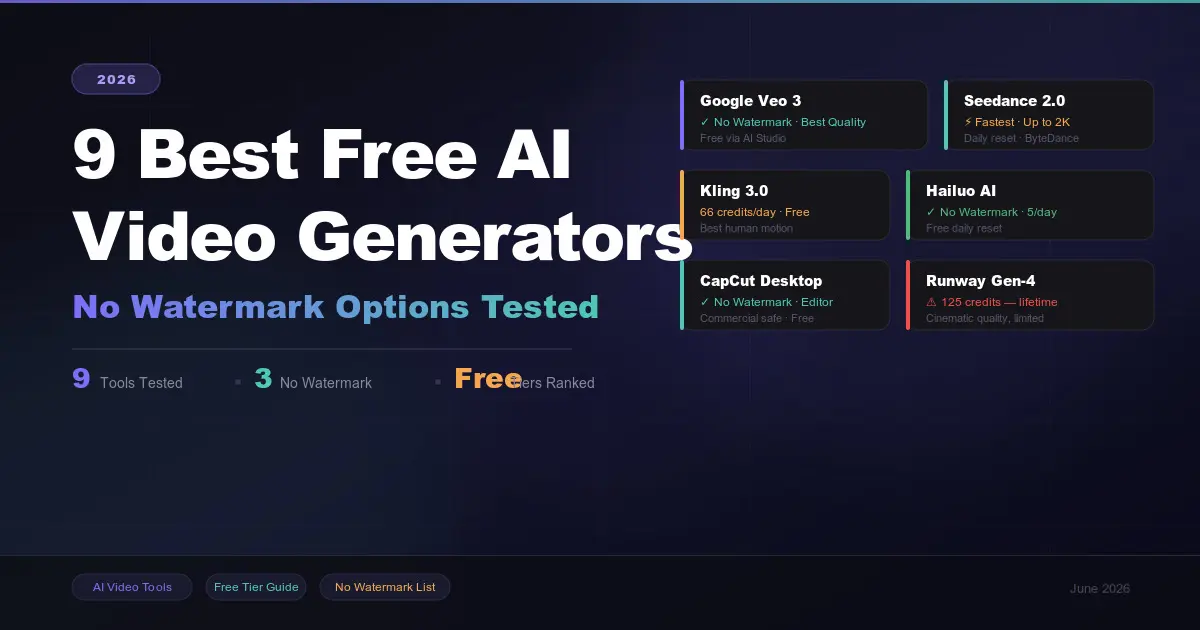
9 Best Free AI Video Generators in 2026 (No Watermark Options Tested)
The Quick Comparison: Best Free Picks at a Glance
If you don't have time to read the full breakdown, here is how the top free tiers shake out right now:
| Tool | Free Allowance | Max Resolution | Best For | Watermark? |
|---|---|---|---|---|
| CapCut (Desktop) | Unlimited | 4K | Social Media & Shorts | No (On Desktop) |
| Google Veo 3 | Rate-limited | 1080p | Cinematic B-Roll | No (via AI Studio) |
| Seedance 2.0 | 10 daily clips | 1080p | Blazing Fast Turnaround | TBD / Minimal |
| Kling 3.0 | ~66 credits/day | 720p | Natural Human Motion | Yes (Free tier) |
| Frameloop | Base Tier | 1080p | Faceless Marketing Ads | No (Base tier) |
Deep Dive: The Top 5 Free AI Video Tools
1. CapCut Desktop (The Secret Weapon for Social Creators)
If your goal is to make TikToks, YouTube Shorts, or Instagram Reels without a watermark, CapCut’s desktop application remains the absolute best completely free workflow in 2026. While its generative engine isn't as cinematic as standalone models, its utility is unmatched.
The Free Catch: You need to use the desktop version rather than the web app to get the cleanest, watermark-free 4K exports.
Best Feature: Smart script-to-video tool that auto-applies overlays and captions.
2. Google Veo 3 via AI Studio (Best Raw Visual Quality)
Google Veo 3 produces the most stunning, hyper-realistic physics and complex scene layouts of any model available this year.
The Free Catch: It isn't advertised as a consumer video tool. To use it for free, you have to access it through Google AI Studio. It is rate-limited but completely watermark-free.
Best Feature: Incredible physics engine. Objects interact, explode, or move through space with accurate lighting and zero awkward warping.
3. Seedance 2.0 (The Speed Champion)
Developed by ByteDance, Seedance 2.0 dropped earlier this year and completely disrupted the space by cutting rendering times down to a staggering 30 seconds per clip.
The Free Catch: Offers 10 free generations per day.
Best Feature: Outstanding Image-to-Video generation. If you use a tool like Midjourney or Leonardo to build a still image, Seedance animates it flawlessly.
4. Kling 3.0 (The King of Human Motion)
If your video involves characters dancing, walking, or speaking, Kling 3.0 handles facial consistency and organic movement significantly better than its competitors.
The Free Catch: The free tier gives you around 66 credits daily (roughly 4–6 standard clips), but it limits your resolution to 720p and applies a watermark.
Best Feature: Unmatched body physics. Hands and fingers don't morph mid-scene.
5. Frameloop (Best for Faceless Channels & Ads)
For creators looking to build modular product explainers or marketing copy without a massive learning curve, Frameloop offers excellent scene-based editing tools.
The Free Catch: The entry-level workspace tier lets you generate short faceless loops without watermarks, but longer projects require an upgrade.
Best Feature: It generates an entire scene sequence rather than a singular isolated clip, making it easier to script cohesive stories.
Frequently Asked Questions (FAQs)
Which free AI video generator has no watermark in 2026?
CapCut (Desktop app) and Google Veo 3 (accessed via Google AI Studio) are the top two tools in 2026 that let you export high-quality AI-generated video workflows without any watermarks on their free tiers.
Can I generate an entire 10-minute video for free using AI?
Not in a single prompt. Most generative tools max out at 4 to 10 seconds per clip on free tiers. To make a 10-minute video, you need to use an aggregator tool or generate separate clips and stitch them together using a free editor like CapCut.
Is text-to-video or image-to-video better for free users?
Image-to-video generally gives cleaner results. Because free tiers have lower processing priority, text-to-video prompts can sometimes result in visual glitches. Generating a high-quality static image first, then uploading it to an AI video tool yields much more consistent, realistic motion.

Continue Reading
Recommended Articles
Recent Posts

9 Best AI Video Generators in 2026: Create Videos from Text, Images & Prompts
7 Best Free AI PPT Generators in 2026- Create Presentations in Minutes
25 Best ChatGPT Prompts for Students in 2026: Study Smarter, Save Time & Improve Your Grades
A2E AI Review 2026: This AI Video Generator Gives Free Credits Every Day

Why I Started Solvex Technologies After 9 Years in Software Development
Best Free AI Video Generators (2026) - The Honest Guide
Best Free AI Video Generators in 2026 (No Watermark Text-to-Video Tools Reviewed)